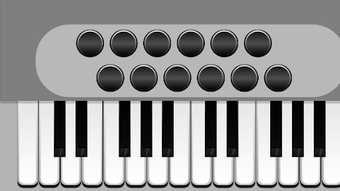

Free Piano Accordion for Android
Overview
Accordion is a free Android application developed by Kofiro, designed to emulate the sound and functionality of a piano accordion. The software falls under the Music & Radio category and is tailored for musicians, music students, and enthusiasts seeking a virtual instrument for practice, composition, or casual play. It enables users to explore the unique tonal qualities of a piano accordion without the need for physical hardware.
The app is available for Android 13.0 and above, making it accessible to users with modern devices. Although the developer did not provide additional context about their background, the app's release on Softonic suggests a focus on accessibility and broad reach within the mobile music community. Real-world usage scenarios include on-the-go music practice, digital composition, and experimentation with accordion sounds in home studios.
The app supports multiple languages, including English, Russian, and Portuguese, enhancing its usability across international audiences.
Key Features & Capabilities
- Virtual Piano Accordion Emulation – Simulates the authentic sound and mechanics of a piano accordion, allowing users to play chords and melodies using touch controls.
- Multi-Language Interface – Offers accessibility in English, Russian, and Portuguese, supporting users from diverse linguistic backgrounds.
- Mobile-Optimized Touch Controls – Designed for intuitive interaction on touchscreen devices, with responsive key layouts for both melody and bass sections.
- Lightweight Design – At 28.4 MB, the app is compact and efficient, ensuring minimal storage impact on Android devices.
- Free Access – Available at no cost, making it accessible to students, hobbyists, and budget-conscious musicians.
These features cater to users who want a portable, affordable way to engage with accordion music. For instance, a music student can use the app during travel to practice finger positioning or chord progressions. A composer might integrate the virtual instrument into a digital audio workstation setup for sketching ideas. The app’s lightweight nature ensures it runs smoothly on a range of Android devices without draining system resources.
User Interface, Workflow & Performance
The user interface of Accordion is designed with simplicity and functionality in mind, focusing on clear visual feedback and responsive touch interaction. Navigation is straightforward, with the core instrument layout taking center stage. Users can access melody and bass sections through intuitive touch-based controls, with no complex menus or layered settings.
The workflow is optimized for immediate play, allowing users to start producing sound with minimal setup. The developer did not specify resource usage details, so exact performance behavior in terms of CPU or RAM consumption remains unknown. However, the app’s small file size suggests efficient code structure and low overhead.
Stability is expected to be consistent for users on Android 13.0 or higher, though real-world testing data was not provided. Performance observations are based on general software behavior patterns for similar mobile music applications.
Compatibility & System Requirements
Accordion is compatible with Android 13.0 and above, ensuring it runs on recent Android devices. The app has a file size of 28.4 MB, which is considered lightweight for a music application. The developer did not provide additional system requirements, such as minimum RAM or processor specifications.
Compatibility information was partially provided, with the operating system and version clearly stated. Users should ensure their device meets the minimum Android version requirement to install and run the application. No specific hardware features, such as Bluetooth support or audio output requirements, were mentioned.
The absence of detailed technical specifications limits the ability to assess performance on older or low-end devices.
Pros and Cons
Pros
- Free to download and use, making it accessible to all users
- Compact size of 28.4 MB, ideal for devices with limited storage
- Supports multiple languages, enhancing global usability
- Intuitive touch interface designed for mobile play
- Emulates a real piano accordion with authentic sound characteristics
Cons
- No information on system requirements beyond Android 13.0
- Limited to Android platform; no support for iOS or desktop
- No details on audio output quality or latency
- Version .20 suggests early development stage; future updates may be needed
- Lack of advanced features like recording or MIDI export
FAQ Section
Is Accordion available for free?
Yes, Accordion is a free application. There are no charges for downloading or using the app.
Which Android versions are supported?
Accordion requires Android 13.0 or higher to run. Devices running older versions may not be compatible.
Can I use Accordion offline?
Yes, the app does not require an internet connection to function. All features are available offline.
Does Accordion support MIDI or audio export?
The app’s functionality does not include MIDI export or audio recording features. Users cannot save or share their performances.
How often are updates released?
Update frequency is not publicly disclosed. The current version is .20, which may indicate ongoing development.
Final Thoughts
Accordion by Kofiro delivers a focused, lightweight solution for anyone interested in exploring piano accordion music on Android. Its free access, compact size, and multilingual support make it a strong choice for beginners and casual users. While it lacks advanced features like recording or MIDI integration, it excels in providing an authentic playing experience on mobile devices.
The app is particularly well-suited for music students, hobbyists, and those seeking a portable instrument for creative exploration. Despite limited technical details, the app demonstrates thoughtful design for its intended audience. For users on Android 13.0 or newer, this virtual instrument offers a convenient and accessible way to engage with accordion music.
Download Accordion now.





.png)

